
The issue
For newcomers to remediating PDFs, it can seem like a daunting task. First, you need to find sometimes hundreds, even thousands of documents across several sites. Then you need to figure out which ones need remediation. If you are working with a team, keeping track of who is working on what can get complicated, especially across multiple departments.
One department might send documents through email, another might use a shared folder, and someone else might be looking for a PDF uploaded years ago. Before fixing anything, you have already spent time figuring out what you have and where it is.
Then the remediation starts, by hand, one by one. If you have help, they may need training. Someone has to learn the software, understand what needs fixing, and work through the documents. If you are handling this alongside your regular job, finding the time can be difficult.
Many organizations outsource remediation, which helps with the second half, but the “finding and organizing the PDFs” part often stays with their team. Then they need the remediated files back in time to use them.
And once that first batch is finished, more documents may already be waiting. Departments keep creating PDFs, and websites keep changing. Having a process you can use again saves time.
Accessibility problems remain widespread. WebAIM’s February 2026 analysis of one million home pages found detectable WCAG failures on 95.9% of them, averaging 56.1 errors per page. Those figures concern web pages, not PDFs, but they show why accessibility needs ongoing attention.
What we created to solve it
Back when we were a website company, these issues were plaguing our clients. When we looked for a solution that handled the process the way we needed, we found none. So we created the VORA dashboard: View, Organize, Resolve, A11y.
We spent several months and hundreds of hours developing a pipeline to simplify the process from beginning to end in an affordable way. The problems our clients brought us shaped what we built.
One practical lesson was that the work starts before remediation. Finding and organizing the files can take up time that a team expected to spend fixing them. That is why we put discovery and sorting into the same dashboard as remediation. We wanted someone to sit down, see what they have, and get started without spending days preparing everything.
How to use the VORA dashboard
First, the VORA dashboard comes with a free crawler. Enter your website, and it finds and imports PDFs into one place. This saves you from going through the website page by page, opening links and downloading documents individually.
Once the files are gathered, decide which documents people still use and which department owns each one. It is easier to plan the work when someone can confirm that you are fixing the current version. The dashboard lets you organize by site or project and give team members access to the areas they handle.
Second is finding out which PDFs need attention. Our automated PDF accessibility audit sorts uploaded PDFs into those likely needing remediation and those likely not needing remediation.
The word “likely” matters. We have found the sorter reliable in our testing, but its result is not a guarantee that a document has no accessibility issues. Use it to prioritize your review, then check the documents that matter to your users.
Once your PDFs are uploaded and sorted, you can start remediation with our free remediation editor or use the automated option with credits.
Choose based on the time you have and how much work you want to handle manually. For automation, review the credit estimate before starting. Our current pricing is $4 per credit, with one credit per page and one additional credit per table. A three-page PDF with one table uses four credits, or $16.
The last issue we tackled was handling PDFs that need human input or review. Our tagging system routes files that fail automation or need additional judgment to a specialist for manual work at no extra charge. Nuanced alternative text and tables with unclear relationships are examples of work that may need that attention.
Review the completed PDF and its report before publishing. The dashboard keeps them together so you can inspect the output and see what was checked.
One of our clients had PDF remediation work that would usually take them weeks completed in an afternoon. We regularly see similar results for our customers.
The number and complexity of your PDFs, along with specialist review, affect turnaround. An afternoon will not be the outcome for every project. Removing manual searching and sorting helps reduce the work that can stretch the process out.
Under our current launch offer, dashboard access stays free permanently for accounts created during launch. Crawling, sorting, and the manual editor are included; automated remediation uses paid credits. Even if someone else handles your remediation, the free tools can help with finding and organizing your files.
Try it with your own PDFs
And I know you are probably thinking, well, how good is the automated remediation? I would say it is very good, but you can inspect an actual result. Our published Form 1040 example shows the 2025 IRS tax form processed through the platform with 185,351 validation checks and zero manual fixes needed.
All automated checks represented in that sample report passed. That is a result for one document, not a success rate for every PDF. The check count includes checks across the document and its content; it does not mean 185,351 separate accessibility standards. Our case study includes the source and remediated files so you can examine the difference yourself.
Before and after: 2025 IRS Form 1040
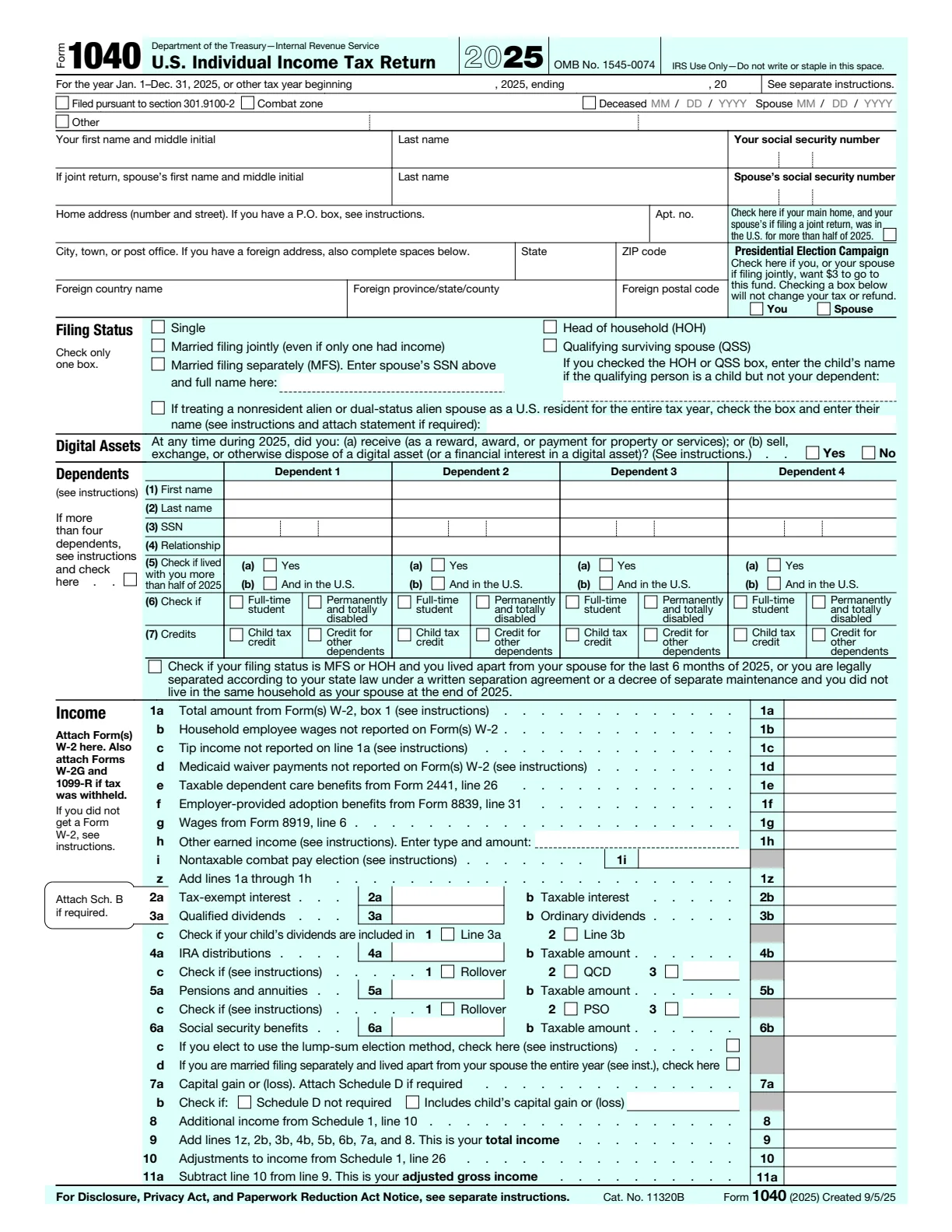
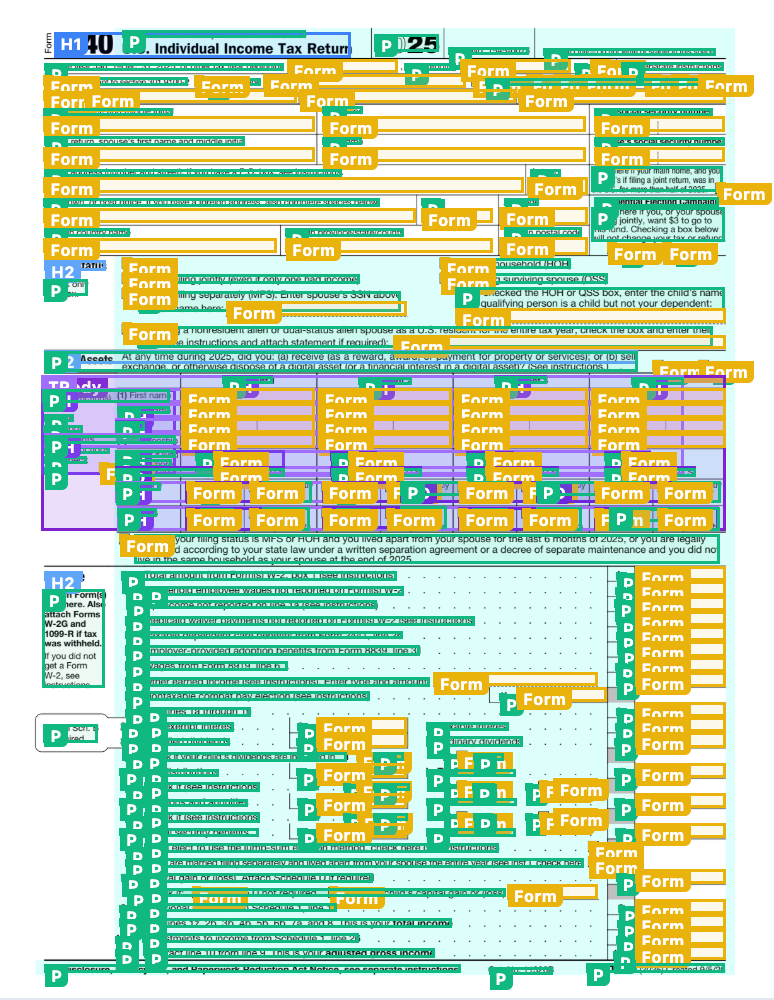
The overlay makes the structural tags visible; the remediated PDF keeps the original visual layout. Explore the full case study and sample results.
Each new dashboard comes with 10 free remediation credits. Start with a document you already work with, inspect the output, and see how the process fits your needs.
And we are always up for a meeting to talk through your documents and deadline. These are the same kinds of problems that led us to build VORA, and we would be happy to help you work through them.
Daniel White — Director of Operations, Vora Studios
Daniel leads operations at ADAComply, supporting clients and helping improve the company’s document accessibility workflow. Meet Daniel and the team.
Start with your own documents
Create your free dashboard and try the workflow with 10 free remediation credits.
Get started freeHeader photograph: PxHere, CC0 public domain.